

A TV is a TV until it has to run a menu board for 14 hours a day.
That's usually when the question comes up. Consumer TVs cost less and are easy to buy, and a commercial display can look like the same panel with a bigger price tag. For one or two indoor screens that run during business hours, a consumer TV is usually enough. For long hours, bright rooms or hard-to-reach installs, plan for a commercial display, because a consumer warranty can shrink or stop applying once the TV is used commercially.
The numbers below come from Samsung and LG spec sheets and warranty terms.
How a commercial display differs from a consumer TV
Many consumer TVs and commercial displays use similar LCD panels with LED backlights. What sets a commercial display apart from a consumer TV is what the manufacturer designs, tests and warrants it to do.
A consumer TV is built for a living room. Samsung's US consumer TV terms say so plainly: "Your product is intended for residential use only," and "Your product is not intended for industrial or commercial use; it is for personal use only."
A commercial display, sometimes sold as a commercial-grade TV, is sold for business use. Its spec sheet lists details a home buyer rarely needs. Samsung's QBC and QMC signage lines and LG's UH5N-E series all publish a rated number of operating hours, a typical brightness figure and a screen haze value. They also list control ports such as RS232C and RJ45, plus portrait mounting support.
Samsung also points to management. Its business TV page says that "Unlike consumer TVs, Samsung hospitality TVs are compatible with content management solutions, letting you control content across TVs from one central location."
Operating hours are the first spec to check
Commercial spec sheets state how many hours a day the display is designed to run, written as hours per day and days per week. You'll mostly see two figures in the sheets cited here.
- 16/7 means 16 hours a day, seven days a week. Samsung lists its QBC series at 16/7, and its QBB data sheet describes that series as "engineered for dependable 16/7 operation."
- 24/7 means continuous operation. Samsung's QMC series and LG's UH5N-E series are both rated 24/7. LG's UH5N-E spec sheet lists a lifetime of up to 50,000 hours. It adds that lifespan "will vary depending on usage" and that LG makes no warranty on that figure.
Samsung's consumer safety instructions go the other way. They tell owners to contact an authorized service center before installing the product where it "will operate 24 hours a day," and warn that skipping this "may lead to serious damage to your product."
Match the rating to your real schedule. A shop open from 9 to 6 needs far fewer hours than a hospital wayfinding screen or an airport arrivals board. If a spec sheet doesn't list operating hours at all, ask the seller before you assume.
Brightness depends on where the screen sits
Signage spec sheets give brightness in nits (candelas per square meter), and typical brightness is the figure to compare. Four published commercial lines show how wide the range is.
| Display | Typical brightness | Rated hours |
|---|---|---|
| Samsung QBC series | 350 nits | 16/7 |
| Samsung QMC series | 500 nits | 24/7 |
| LG UH5N-E series | 500 nits | 24/7 |
| Samsung OMN-D window display | 3,000 nits (window side) / 1,000 nits (indoor side) | 24/7 |
Figures come from manufacturer spec sheets dated 2020 to 2024, and Samsung marks the QBC sheet "Specs are preliminary," so check the current sheet before buying.
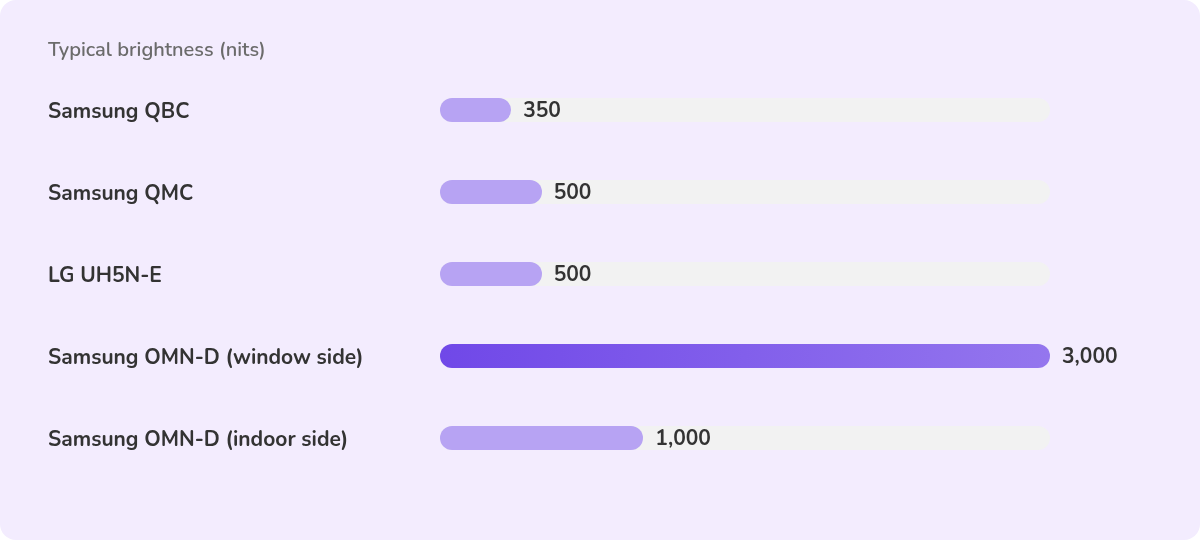
An office or restaurant with controlled lighting rarely needs the top of that range, while a street-facing window often does. Samsung says the window-facing side of its OMN-D series uses 3,000 nits to hold the picture "regardless of sunlight," while the in-store side runs at 1,000 nits.
A 350-nit commercial panel isn't automatically brighter than a consumer TV. For indoor screens, the clearer differences are the rated hours and the screen finish. The Samsung QMC and LG UH5N-E use a matte finish (25% and 28% haze) to cut reflections, and LG says the anti-glare coating "reduces screen reflection in bright lighting environments."
Warranty terms change once a TV goes to work
Warranty terms live on the warranty card, not the box, so they're easy to miss.
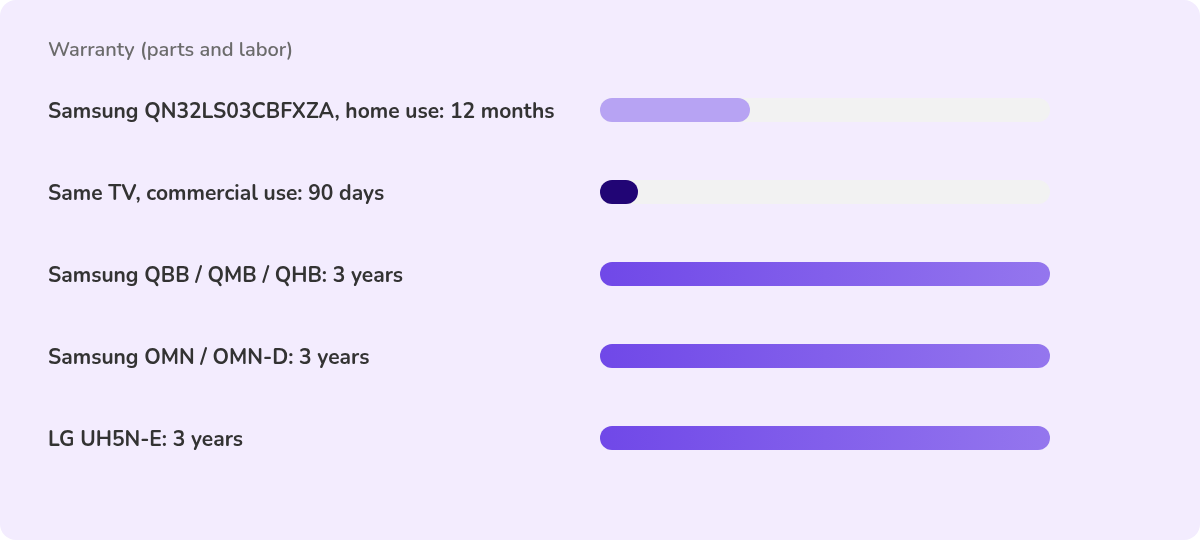
Samsung's US warranty for one consumer model, the QN32LS03CBFXZA, listed 12 months of parts and labor as of August 2023, then added "For commercial use, the warranty is 90 Days Parts and Labor." Samsung's current US consumer terms also exclude "brightness related to normal aging or any other issues caused by commercial or non-normal consumer use of this product."
Samsung's business TV page puts it more directly: "Consumer TVs have shorter warranties (i.e. 90 days) which can be voided if the TV is used commercially."
Commercial lines carry their own terms. Samsung describes a 3-year limited warranty on its QBB, QMB and QHB series and a 3-year warranty on its OMN and OMN-D window displays. Its hospitality TVs "now come with updated 3 year warranties." LG lists a 3-year limited warranty on its UH5N-E series.
Warranty terms vary by model, country and reseller, so read the card for the exact unit you plan to buy.
Heat, dust and installation
Signage screens end up in a kitchen pass, on a warehouse wall or in a recess above the counter where the coffee machine vents.
Samsung's consumer instructions ask owners to keep at least 4 inches (10 cm) of space around the TV for ventilation and say "Do not install the product in a confined space such as a bookcase or similar enclosure." They also say "Do not install the product in an area where it is exposed to direct sunlight." For dusty, hot, cold or humid locations, they again tell owners to contact a service center first.
Commercial displays publish their protections. LG says the conformal coating on the UH5N-E power board and its IP5X rating help "guard against salt and iron particles." Samsung lists IP5X dust protection on its QBB, QMB and QHB series and says its OMN displays "are engineered to prevent overheating."
If your screen will sit in a tight enclosure or near heat, check the operating temperature and ventilation notes on the spec sheet first.
When a consumer TV is a reasonable choice
A consumer TV can be a sensible buy when the risk is small and you accept the terms, for example when:
- The screen runs during business hours and is switched off overnight.
- It sits indoors, out of direct sun, with space around it to breathe.
- It's one or two indoor screens you can see and reach, such as a break room screen or a small office dashboard.
- You can replace it without disrupting the business, and you accept that the commercial warranty may be short or void.
You can still manage it centrally, and the route depends on its platform. A consumer smart TV with Android TV or Google TV built in can run the Fugo app from Google Play with no external player, on Android 7.1.2 or newer (Fugo recommends Android 10 or newer), and it opens straight into the app on boot (Fugo's Android page). Fugo runs directly on Samsung's commercial SSSP displays and LG webOS Signage panels. Fugo's Samsung SSSP page and LG webOS Signage page say a consumer Samsung or LG TV needs an external media player, such as an Android-based one.
You pay less upfront, and if the set fails in commercial use you may be relying on a 90-day warranty, or none.
When a commercial display earns its price
A commercial display is worth the extra cost when downtime or replacement would hurt.
Look for one when the screen will run past a normal working day or around the clock, faces a sunny window or bright atrium, or sits somewhere hard to reach once mounted. Larger rollouts also benefit from network control. Samsung lists RJ45 MDC control on its OMN sheet, and LG lists SuperSign Control and Control Manager for the UH5N-E.
The commercial lines above all support portrait mounting, which suits menu boards and wayfinding. The OMN-D is portrait-only.
Our guide to the best digital signage screens compares specific models. For a manufacturer view of dedicated signage hardware, see our look at Sony BRAVIA Professional Displays. Philips takes a similar approach, covered in our guide to Philips professional displays. For screens that face the street or sit outside, read our outdoor digital signage display guide.
A quick buyer's checklist
Run through these before you buy either kind of screen.
| Question | Where to find the answer |
|---|---|
| How many hours a day will it run? | Operating hours line on the spec sheet (16/7, 24/7) |
| How bright is the space? | Typical brightness in nits, plus haze or anti-glare |
| What happens if it fails at work? | The warranty card, including any commercial-use clause |
| Is the space hot, dusty or enclosed? | Operating temperature, IP rating and ventilation notes |
| Does it need portrait mounting? | Orientation line on the spec sheet |
| How will you manage content? | Built-in platform or an external media player |
If the answers point to a short day, a calm room and a screen you can replace, a consumer TV may be enough. If they point to long hours, bright light or a hard install, plan for a commercial display.
Either way, check that the screen or player you choose works with Fugo. Our Samsung SSSP page and LG webOS Signage page cover the commercial lines Fugo runs on directly. For a consumer Samsung or LG TV, you'll need a media player, and our Android page covers those players along with Android TV and Google TV sets.
Frequently asked questions
Can I use a regular TV for digital signage?
Yes, with limits. A consumer TV can show signage content, either through an app on an Android TV or Google TV set or through an external media player. Manufacturer terms may still restrict commercial use. Samsung's US warranty for one consumer model, the QN32LS03CBFXZA, dropped to 90 days of parts and labor for commercial use as of August 2023.
What's the difference between a commercial display and a consumer TV?
A commercial display is designed and warranted for business use. Its spec sheet usually lists rated operating hours, typical brightness, haze, control ports and portrait support. A consumer TV is designed for home use, and its terms reflect that.
What does 24/7 or 16/7 mean on a display?
It's the rated duty cycle, written as hours per day and days per week. 16/7 means 16 hours a day, every day. 24/7 means the display is designed for continuous operation.
Does using a consumer TV commercially void the warranty?
It can. Samsung says consumer TV warranties "can be voided if the TV is used commercially," and the US warranty for its QN32LS03CBFXZA limited commercial use to 90 days of parts and labor as of August 2023. Check the warranty card for your model and country.
How bright should a digital signage display be?
It depends on the light where the screen sits. Indoor commercial displays such as the Samsung QMC and LG UH5N-E list 500 nits typical brightness. Window displays go much higher, and Samsung's OMN-D lists 3,000 nits on its window-facing side.
Are commercial displays worth the extra cost?
They're worth it when the screen runs long hours, faces bright light or sits somewhere hard to reach. For one or two indoor screens that run during business hours, a consumer TV may be enough.
Can Fugo run on both consumer TVs and commercial displays?
Yes, though the setup differs. Fugo runs directly on commercial Samsung SSSP displays and commercial LG webOS Signage panels. Consumer smart TVs with Android TV or Google TV can run the Fugo app from Google Play with no external player. Consumer Samsung and LG TVs need an external media player. Fugo's Android hardware page, Samsung SSSP page and LG webOS Signage page cover setup for each.