


In the American Psychological Association's 2024 Work in America survey, 43% of U.S. workers said they typically feel tense or stressed out during the workday. In the same survey, 33% said they don't have enough flexibility at work to keep their work life and personal life in balance.
Hours, workload, and flexibility are largely set by the employer, so HR has real room to improve employee well-being and work-life balance. Most of that work sits in how jobs are designed, how managers are trained, how easy support is to find, and how time off is protected. Workplace screens help with the last two, especially for people who rarely open the intranet.
What employee well-being covers at work
The World Health Organization's fact sheet on mental health at work lists the risks to mental health at work, which it calls psychosocial risks. They include excessive workloads or work pace, long or inflexible hours, little control over how work is done, an unclear role, limited support from colleagues or supervisors, and conflicting home and work demands.
Globally, WHO estimates that 12 billion working days are lost every year to depression and anxiety, at a cost of US$1 trillion a year in lost productivity.
WHO groups its recommendations into preventing risks, protecting and promoting mental health, supporting people with mental health conditions, and creating an environment for change. The first three give HR a useful way to sort the work:
- Prevent. Change the working conditions that create strain, such as workload, hours, and flexibility.
- Protect. Train managers and staff to recognize distress and respond to it.
- Support. Help people who are struggling, with accommodations, time off, and access to counseling.
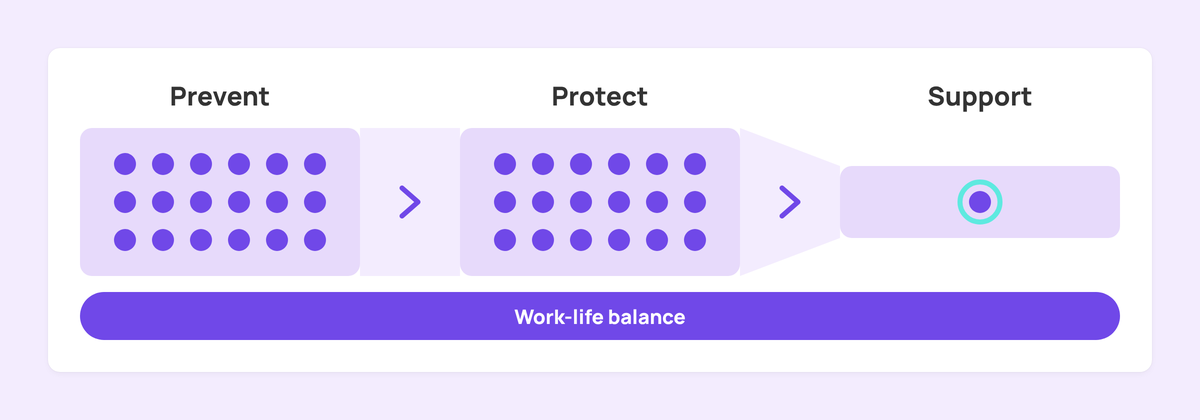
Work-life balance runs through all three. It depends on hours and flexibility, on what managers expect after hours, and on whether people actually use the leave they have.
Start with how the work is designed
WHO recommends that employers manage these risks through organizational interventions, meaning changes that target working conditions and environments. Flexible working arrangements are one of its examples.
Hours are a sensible place to begin. In the APA survey, 45% of employed adults said they have to work more hours per week than they want to.
A practical workload review asks a few questions:
- Which teams regularly work past their scheduled hours, and why?
- Where does work pile up, such as month-end, launches, or short-staffed shifts?
- Who covers when someone is on leave, and is that written down?
- Which roles could flex start and finish times, location, or both?
Some roles can't move location or hours much. For shift teams, look at predictable shift schedules, enough notice of changes, and breaks that actually happen.
Ask the people doing the work before you decide anything. WHO says action on mental health at work should involve workers and their representatives. They usually know where the pressure points are, and they can often say which fixes would make a difference to their week.
Train managers to spot strain and respond
Managers often see rising workload and stress before HR does. WHO recommends manager training for mental health that helps managers recognize and respond to emotional distress, and builds skills like open communication and active listening.
In the APA survey, 59% of workers said their employer thinks the work environment is a lot mentally healthier than it actually is, and 39% worried that telling their employer about a mental health condition would hurt them at work.
Training can narrow that gap. Cover a few basics:
- How to ask about workload in a regular one-on-one, and what to do with the answer.
- What reasonable accommodations look like. WHO lists flexible hours, extra time for tasks, and time off for health appointments.
- Where to refer someone, including the EAP and a named contact in HR.
- What managers keep confidential, and what they pass on.
Managers also set norms by example. A manager who sends messages late at night sets an expectation for the team, even where the written policy says replies can wait.
Make support easy to find
An employee assistance program (EAP) is a common starting point. The U.S. Office of Personnel Management describes an EAP as a voluntary, work-based program that offers free and confidential assessments, short-term counseling, referrals, and follow-up services for personal or work-related problems.
Write a one-page summary of what your organization offers:
- The EAP phone number and website, and a line saying it is confidential.
- Mental health benefits in the health plan, and how to use them.
- Leave options, including sick leave and any personal days.
- Who to contact in HR, by name.
Then repeat it, because a launch email is easy to miss. Put the summary in the handbook, on the intranet, in onboarding packets, and in shared spaces such as break rooms and kitchens.
Frontline and shift teams may rarely check email, so the copies in shared spaces are often the ones they see. Our post on frontline mental health tips covers that audience in more depth.
Protect time off and the end of the workday
Work-life balance tends to slip at the edges of the day. One worker quoted in the APA findings described clients who call or text on days off. "I feel stressed not to reply, so I end up working often when I'm supposed to be off."
Clear norms make it easier to switch off:
- Set expected response times for email and chat outside working hours, and say plainly that replies can wait until the next workday.
- Encourage scheduled send for messages written late.
- Plan coverage so people can take full days off.
- Check leave balances each quarter and prompt people who haven't requested time off.
- Ask senior leaders to take their own leave and mention it.
Busy seasons need a plan of their own. If a team knows its peak weeks in advance, agree before they start how extra hours will be handled and when people will get that time back.
Write these norms down and add them to manager training, so every team hears the same message from HR and from its own manager.
Where workplace screens support well-being
Screens in break rooms, kitchens, corridors, and shop floors reach everyone who walks past, including people without a company email account. They suit short, repeated information, which describes most well-being content.
Useful content includes:
- Support details. The EAP number and website, how to book time with HR, and a reminder that the EAP is confidential. People can note the number without having to ask anyone for it.
- Break reminders. A short prompt at usual break times to step away, stretch, or get some daylight. Keep these occasional so they stay noticeable.
- A well-being calendar. Upcoming sessions, health screenings, benefits enrollment windows, and awareness dates your organization marks.
- Policy reminders. Response-time norms, how to request flexible hours, and how to request leave.
- Recognition. Thanks and team milestones. Our guide to employee recognition on digital signage has more ideas.
A few rules keep the screens useful. Never show anything about an individual's health, absence, or leave. Keep one message per slide, with text large enough to read from across the room. Rotate content often enough that people keep looking at it.
Put screens where people pause for a minute or two, such as the kitchen, the break room, a staff entrance, or near the time clock. A screen in a busy walkway gets a glance at most, which suits one short line and little else.
Setting up well-being screens in Fugo
If you use Fugo, these features cover most of the setup:
- Repeat reminders at set times. A playlist combines content, screens, and an optional schedule. A recurring schedule can repeat daily or weekly, run on chosen days of the week, and play only within time windows you set. A break reminder can run mid-morning and mid-afternoon on weekdays.
- Time one-off announcements. A timer trigger plays a chosen playlist at a set date and time, such as a lunchtime announcement. The screens then return to their normal rotation.
- Give campaigns an end date. Set a benefits enrollment or awareness-month playlist to start and expire on chosen dates, so it comes down on its own.
- Keep the source in Google Slides. If HR maintains a well-being deck in Google Slides, the Google Slides app syncs your edits to the screens automatically.
- Reuse a layout. Save a support-details slide from Design Studio as a company template, so every space in your Fugo account can use it. Company templates are available on Core and Enterprise plans.
- Include remote staff. A virtual screen shares playlists through a browser link or an iFrame embed in tools like Notion, Confluence, or SharePoint. Virtual screens are available on Core and Enterprise plans, and each one uses a screen license.
For other ways teams use workplace screens, see our page on internal communications digital signage.
How to tell if your well-being program is working
Pick a small set of measures and review them every quarter:
- Survey answers on workload, stress, and whether people feel able to switch off.
- Overtime hours, and how often schedules change at short notice.
- Leave taken compared with leave available.
- EAP usage, as aggregate figures from the provider and never individual records.
- Turnover, and what people say in exit interviews.
Share what you found and what you plan to change. WHO lists the participation of workers in decision-making as part of an environment that supports change, and a visible response gives people a reason to answer the next survey.
When a measure moves, look at the team behind it before you change the whole program. Rising overtime in one department often points back to the workload review for that department, and low leave uptake in one site may mean coverage isn't in place there. For broader habits in everyday staff communication, read the internal comms checklist.
FAQs
What is employee well-being?
Employee well-being describes how work affects people's physical and mental health and their quality of life. It covers workload, hours, flexibility, relationships with managers and colleagues, and the support available when someone is struggling.
How can HR support work-life balance?
Start with predictable hours and flexibility where the role allows it. Set clear norms for messages outside working hours, plan coverage so people can take leave, and train managers to talk about workload in regular one-on-ones.
What causes poor well-being at work?
The World Health Organization lists risks such as excessive workloads, long or inflexible hours, little control over how work is done, unclear roles, limited support from colleagues or supervisors, and conflicting home and work demands.
What is an employee assistance program?
An employee assistance program, or EAP, is a voluntary, work-based program that offers free and confidential assessments, short-term counseling, referrals, and follow-up services for personal or work-related problems.
How do managers affect employee well-being?
Managers shape workload, schedules, and after-hours expectations, and they are often the first to notice someone struggling. WHO recommends training managers to recognize and respond to emotional distress.
How do you measure employee well-being?
Combine regular survey questions on workload and stress with data you already hold, such as overtime, leave taken, aggregate EAP usage, and turnover. Review the measures each quarter and share what you will change.
How can digital signage support employee well-being?
Screens in break rooms, kitchens, and shop floors can show EAP details, break reminders, a well-being calendar, and policy reminders to staff who rarely check email. Recurring schedules let reminders play at set times on chosen days.
What should stay off well-being screens?
Anything about an individual's health, absence, or leave. Keep screens to general information that anyone can see, such as support contacts, events, and team-wide reminders.
Pick one change for next month
If you are building support for employee well-being from scratch, start with one change HR controls, such as a written response-time norm or a one-page support summary. Then tell people about it more than once.
When you are ready to put that summary on screen, our office digital signage page shows how teams run their workplace screens with Fugo. You can also start a 14-day free trial and set up a break-reminder playlist this week.


