


Someone at the front desk asks whether the lobby screen could show the news. A bar manager wants the match on the big screen between drink promotions, and a plant manager wants the company town hall live on the factory floor. They're all asking whether a digital signage screen can play live TV.
It can, as long as you have the right kind of stream and the right to show it. Below you'll find what IPTV means, how it differs from the streaming apps on a home TV, what a screen needs before it can play a live channel, how to set one up in Fugo, and the licensing to settle before you start.
What IPTV means for digital signage
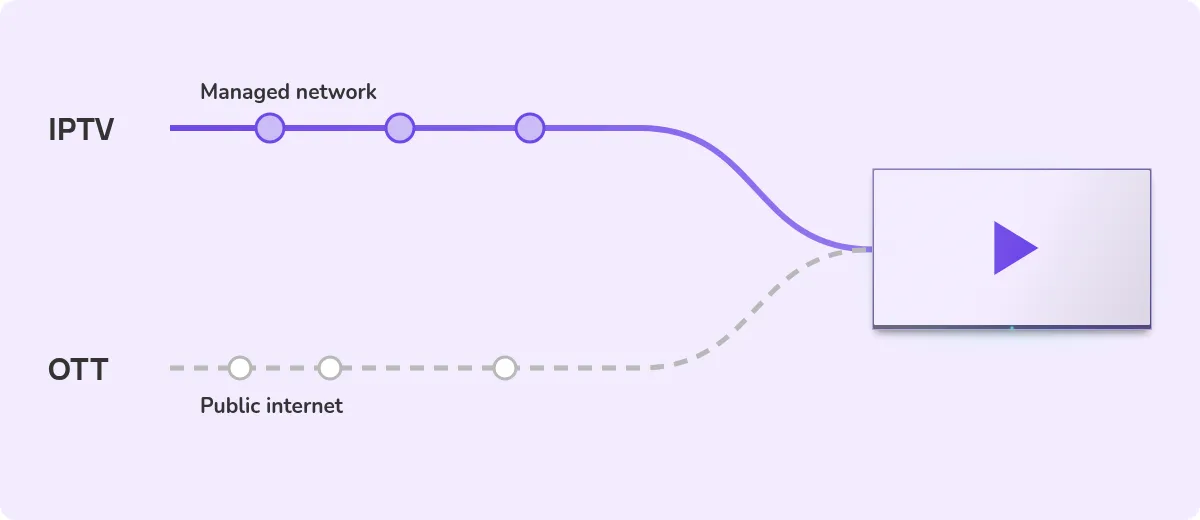
IPTV stands for internet protocol television. It's television delivered over an IP network instead of through an antenna, a satellite dish or a cable box. In our guide to OTT streaming for sports bars, IPTV means TV that runs across a managed, controlled network. A hotel that sends its channels to every room over its own infrastructure is running IPTV.
OTT, short for over the top, is the close cousin. It also arrives over IP, but it travels across the public internet with nobody managing the path between the provider and your building. Netflix, Prime Video and DAZN are OTT services.
For digital signage, the difference between IPTV and OTT is mostly about where the stream comes from. A signage player needs a stream it can open directly. In practice, that usually means an HLS link. Fugo's part is to play that stream on your screens. Sending broadcast channels around a building is the work of an IPTV headend, which Fugo doesn't replace.
HLS, or HTTP Live Streaming, is a format created by Apple for sending live and on-demand video. According to Apple's developer documentation, it uses ordinary web servers and adapts playback to the speed of the connection. Many encoders, broadcast tools and channel providers can output an HLS link, which is a web address that usually ends in .m3u8.
Why businesses put live TV on signage screens
- Bars, pubs and sports venues want live sport on several screens at once, with their own promotions in the gaps.
- Hotel lobbies, receptions and waiting areas want a news channel running so the wait feels shorter, often with a welcome message or a clock beside it.
- Factories and warehouses want a company broadcast or an internal channel on the floor, where staff have no desk to watch from.
- Offices and campuses want live events, such as an all-hands meeting or a product launch, on every screen in the building.
In each case the screen already exists and already shows other content. The goal is to add a live feed without a separate set-top box, a laptop taped behind the TV or a remote that someone has to find. A signage platform lets the live stream sit inside a layout, run on a schedule and switch off when the event ends.
The other thing people mean by IPTV
Search for IPTV and many of the results are subscription services selling large channel bundles for a low monthly fee. Our OTT guide notes that most of these are unlicensed, and that they have nothing to do with the technology described here apart from the name.
A screen in a bar or a lobby is a public showing, and a cheap channel bundle bought online won't give you the right to put live sport or premium channels in front of customers. Everything below assumes a licensed stream, such as your own channel, a stream supplied by a rights holder or a feed from equipment you're entitled to use commercially.
Licensing comes first
Before you buy any hardware, check whether you're allowed to show the content.
Our OTT guide puts the core rule plainly. A domestic subscription never covers commercial premises. A home streaming account or a home satellite package can't lawfully be used to show content in a venue, whatever equipment sits between the source and the screen.
For live sport and premium channels, that means a commercial agreement with the provider holding the rights, such as Sky Business or TNT Sports Business in the UK, or DirecTV for Business in the US. The same guide notes that consumer subscriptions also limit how many streams can play at once.
Your own content is usually simpler. A company broadcast, a recorded town hall or a channel you produce yourself can generally go on screens you control, as long as any music or footage inside it is cleared too. Rules differ by country and by type of content, so check the terms of each source, and take legal advice if you aren't sure.
What you need before a stream reaches a screen
Before you touch any settings, check four things.
- A stream link in HLS format. Fugo's Video Stream app is built around HLS. The help guide notes that MP4 links may work too, but they aren't officially supported.
- A link served over HTTPS. Signage players load Fugo over a secure connection, and the help guide explains that browsers block insecure video sources on a secure page.
- A supported player on each screen. Fugo runs on a range of signage hardware, including Android and Windows players, Samsung SSSP displays and LG webOS Signage displays. Test the stream on your own player before you roll it out.
- Enough bandwidth. Each screen pulling its own stream opens its own connection, and those connections add up. Our OTT guide estimates 6 to 8 Mbps for a single 1080p stream at 60 frames per second, so a handful of screens can use a large share of a small business connection.
If the live source is a satellite or cable box, an encoder can turn its HDMI output into a stream. The Video Stream app still needs an HLS link served over HTTPS that each player can reach, so check the encoder can output one. And it only works if your subscription allows commercial use on every screen you plan to feed.
How to show an IPTV stream with Fugo
Once you have a working link, setup happens in the Video Stream app. These steps follow the Video Stream app guide in the Fugo Help Center.
- Add the Video Stream app. Open Playlists, create a playlist and switch the source selector to Apps, then pick Video Stream. You can also place the app inside a design in Studio, or publish it straight from the App Store.
- Paste the stream link. In the app settings, enter the HLS address in the Video URL field. You can also set the slide duration and mute the audio.
- Build a layout if you want one. In Studio, the stream can share a slide with your logo, a ticker, a QR code or another app, such as a world clock.
- Choose the screens. Pick screens or screen groups by name, or target every screen with a matching custom property, such as a location.
- Set a schedule. Run the playlist always on, during a one-off date range, or on chosen days and hours each week. A recurring slot suits a weekly match or a morning news hour.
- Preview and publish. Check the preview, name the playlist and publish it.
If the stream doesn't play, the help guide suggests three checks. Open the link in a browser-based HLS test player, confirm it uses HTTPS, and make sure the source is actually live.
Keeping several screens in step
When several screens in the same room show the same match, small timing gaps become obvious. One screen shows a goal a few seconds before the next, and half the room reacts early.
The Video Stream app has a sync option for this. It needs two things. You run your own copy of the open-source HLS-Proxy tool on a machine on your local network, then enter that machine's address in the Proxy URL field and turn on Should Sync. Every screen connected through the same proxy then plays the same point in the stream at the same time.
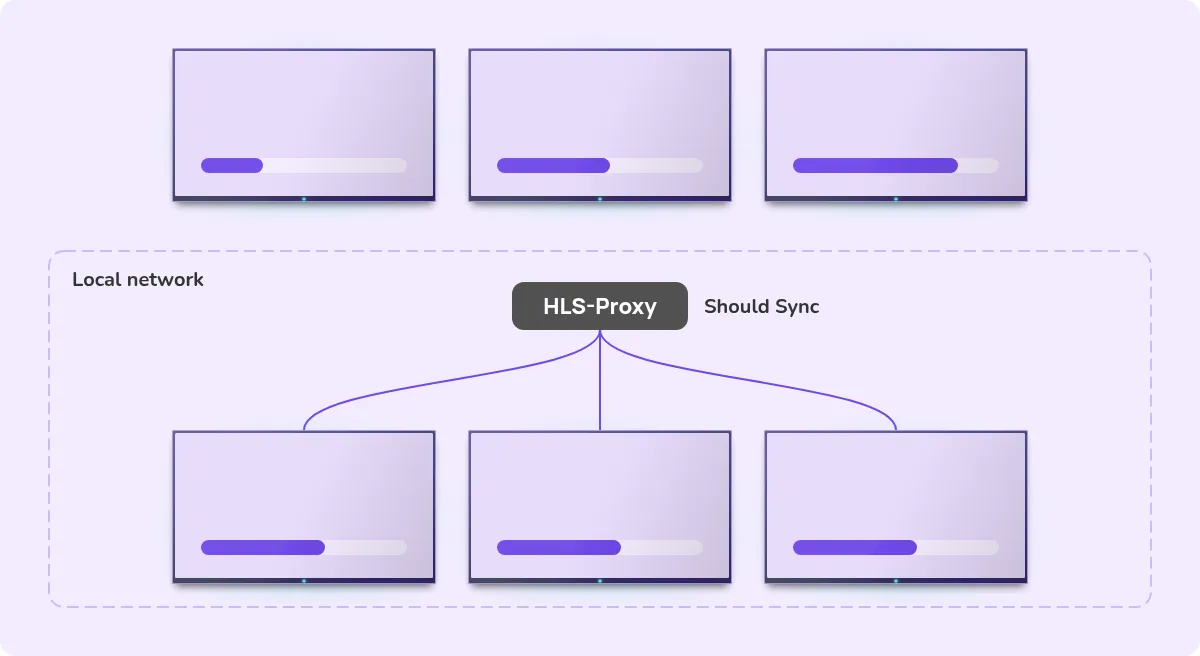
Two caveats from the help guide are worth knowing before you plan around this. Fugo doesn't host or provide the proxy, so you set it up and keep it running. The guide also warns that the proxy approach may not work reliably on Chrome versions above 96, so test it on your own players first.
Frequently asked questions
What is IPTV digital signage?
It means showing a live or on-demand TV stream, delivered over an IP network, on a screen that is managed by digital signage software. The stream can fill the screen or sit inside a layout beside other content.
Can I show live TV on a digital signage screen?
Yes, if you have a stream link the player can open, usually in HLS format, and the right to show that content commercially. In Fugo, you add the link to the Video Stream app and publish it like any other playlist.
Can I use my home TV or streaming subscription at my business?
No. A domestic subscription doesn't cover commercial premises. You need a commercial agreement from the provider that holds the rights to the content.
What stream format does Fugo support?
Fugo's Video Stream app is built for HLS streams, which usually end in .m3u8. MP4 links may work but aren't officially supported. The link should be served over HTTPS.
Why do my screens show the same stream at different times?
Each screen buffers its stream on its own, so screens drift apart. In Fugo, synced playback needs your own HLS-Proxy server on the local network, plus the Proxy URL and Should Sync settings in the app.
Can I schedule a live stream to play at set times?
Yes. A Fugo playlist with a stream in it can run always on, during a one-off date range, or on chosen days and hours each week.
Where to start
Start with one screen and one stream you already have the right to show, such as a company channel or a provider-supplied link. Add it to the Video Stream app, check playback for a day, then schedule it on the rest of your screens. You can try it on a 14-day free trial with no credit card, and plan your time slots with a recurring schedule.


