


Most organizations share important updates the same way: an email to everyone, a post on the intranet or a message in a chat channel. That works well for people who spend the day at a desk. For staff in warehouses, stores, kitchens and factories, who rarely sit at a computer during a shift, those updates often arrive late, second-hand or not at all.
Missed updates like these show how closely internal communication and employee engagement are linked. They affect whether people know what's expected of them, whether they feel heard, and how much time is lost to rework and repeated briefings. This guide looks at how the two are connected, where poor communication costs productivity, and practical ways to reach every part of your workforce, including the people who never open the intranet.
How internal communication connects to engagement
Gallup's State of the Global Workplace report says employee engagement "measures the psychological attachment workers have to their work, their team and their employer." The same page reports that global employee engagement fell to 20% in 2025, its lowest level since 2020.
Gallup measures engagement with the 12 statements of its Q12 survey. Several of them read like a description of good internal communication:
- "I know what is expected of me at work."
- "I have the materials and equipment I need to do my work right."
- "At work, my opinions seem to count."
- "In the last seven days, I have received recognition or praise for doing good work."
Each of these depends on information reaching a person in time. Expectations change with every new procedure, schedule or target. Having the right materials includes having the current version of a work instruction. Opinions only seem to count when people hear what happened after they shared them. Recognition only works if the praise actually reaches the person, and ideally their team.
Communication isn't the only thing that drives engagement. The work itself and the quality of management matter too. But communication decides whether people know what's going on around them, and several of the conditions Gallup measures depend on it.
Where poor communication costs productivity
Gallup's report notes that its meta-analyses "have consistently shown a strong relationship between employee engagement and business-unit productivity, including profitability and sales."
Communication also affects output more directly, in ways most managers will recognize:
- People wait for an answer that went to the wrong channel.
- A team follows an old procedure because the new one is still sitting in an inbox.
- Supervisors spend the start of each shift repeating the same update to each group.
- A notice board still shows last month's targets, so people stop reading it.
None of these shows up as a line in a report on its own. Together, they add up to rework, delays and managers who spend their time passing on updates instead of having the conversations that build engagement.
Fixing this rarely needs a new communication strategy. It usually comes down to three habits: deciding who needs each kind of message, sending it somewhere they'll actually see it, and removing it once it's no longer true.
Reach the people who never open email
Office staff spend the day in their inbox and chat tools. Many frontline employees don't use a computer during a shift at all, so an email to everyone leaves them to hear the news from colleagues, later and less accurately. Reaching them usually takes a mix of channels, and each one does a different job.
- Shift briefings and team huddles let a supervisor explain a change and answer questions face to face. They depend on every supervisor passing on the same message, and they only reach the people who are there at the time.
- Shared screens in break rooms, by the time clock or at entrances reach everyone who walks past, with no login, and show the same message to every shift.
- Email, chat and the intranet still carry the detail, such as the full policy, the form to fill in or the longer explanation.
Screens work well as the link between the other two. They tell people that something has changed and where to find the rest, for example with a QR code that opens the full policy. That leaves supervisors free to spend briefings on questions rather than repeating the basics. Our guide to how digital signage supports frontline employees covers the main uses, and our post on multilingual signage for a deskless workforce covers teams that work in more than one language.
Screen messages work best when people can read them in passing:
- One message per slide, with the action or date first.
- Large text that's readable from where people actually stand.
- A short rotation, so the same person sees an important item more than once a shift.
Time messages to the shift, then let them expire
A safety briefing shown on Friday afternoon does little for Monday's early shift, and a notice that stays up after it's out of date teaches people to stop looking at the screen.
In Fugo, each playlist can have a date range and a week schedule. The date range sets when a message starts and when it expires, so a notice comes down on its own instead of waiting for someone to remember it. The week schedule limits content to certain days and times, such as a welcome message that only runs on weekday mornings. The guides to scheduling content to start and expire and setting up recurring playlists explain how to set both.
For one-off moments, a timer trigger plays a playlist automatically at a date and time you choose, so nobody has to be at a computer to start it. The Triggers overview gives the example of a slide that appears 15 minutes before a Friday all-hands meeting on every screen tagged as staff-facing.
Send each message only to the screens that need it
A notice about one site's parking lot closure is just noise for everyone else.
Fugo's publishing by property lets you target screens by what they have in common instead of picking them by name. You give each screen a value, such as its location or department, and then publish a playlist to every screen with that value. Screens you pair later with the same value start showing the playlist automatically, so your targeting keeps up as you add screens or sites.
Let more people post, within limits
A central comms team can't know every site's news. Site managers, HR and team leads often do, but few of them have time to learn a signage tool.
Fugo's email triggers let them post by sending an email. Each trigger has its own email address, and an email sent to that address puts content on the screens you chose. You decide which emails count, for example by accepting only specific people or your company domain, or by requiring an agreed keyword in the subject line. Fugo can show the email as it arrives or use AI to reformat it into a layout that reads well on a screen. A site manager can share local news from their usual email account, while the comms team still decides who can send and where the message appears.
For urgent news, a manual trigger puts content on screens with one click. It can play once and then hand the screens back to their normal schedule, or loop until someone stops it.
Triggers use the same create, edit and publish permissions as playlists, so the people you already trust with playlists can run them without a separate trigger permission.
Close the loop with two-way communication
The Q12 statement about opinions counting is the one broadcast messages most often miss. A survey or a suggestion box collects views, but opinions only seem to count when people see what happened next.
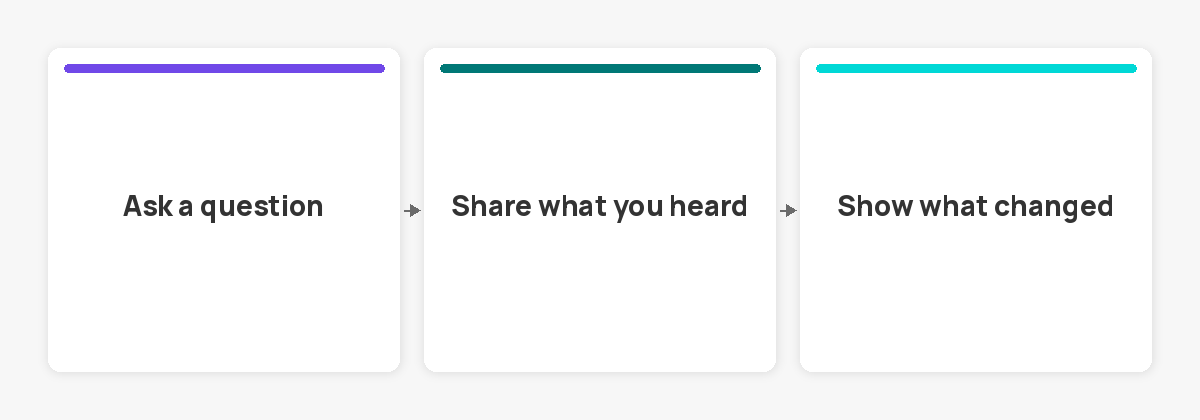
A simple pattern helps. Ask a question, share what you heard, then show what changed as a result. Screens suit the last step, because the update reaches the same frontline teams who answered, including the ones who never read the follow-up email.
Recognition works the same way. Praise in a meeting reaches the people in the room, while a shout-out on a screen reaches the whole site. Our ideas for employee recognition on digital signage cover formats you can reuse.
It also helps to check regularly whether your communication is working. Ask whether people can find the current version of key information, and include a question about communication in your regular engagement survey. Our internal comms checklist has a step-by-step list for planning channels and content.
FAQs
How does internal communication affect employee engagement?
Several conditions that Gallup links to engagement depend on information, including knowing what is expected at work and feeling that your opinions count. Clear, timely communication gives people that information where they work.
How does communication improve productivity?
It cuts waiting, rework and repeated briefings. When people can see current instructions and changes without asking, managers spend less time passing on updates.
How do you communicate with employees who don't use email?
Combine channels that reach people where they work. Supervisors can explain changes in shift briefings, screens in break rooms and entrances can show the same message to every shift, and email or the intranet can hold the detail. Keep screen messages short and point to the full information with a QR code or a named contact.
What should go on workplace screens?
Shift and schedule changes, safety reminders, company news, recognition, and updates on what changed after staff feedback. Give each item an end date so old notices come down.
How often should internal communications go out?
Match the timing to the message. Shift changes need same-day reach, while company news can follow a weekly rhythm. Scheduling and expiry dates keep that rhythm without manual work.
Who should own internal communication?
A central team usually owns company-wide messages and the standards. Site managers and team leads own local news, and letting them post within set limits keeps the central team from becoming a bottleneck.
Where to start
If you want to improve internal communication and employee engagement, start with one group that misses updates today, often a frontline shift. List the three messages they most need each week and note where they usually are when those messages go out.
Then put those messages where that group will see them, give each one an end date, and ask the team a few weeks later whether they feel better informed. To try scheduled and targeted screen messages, start a free 14-day trial of Fugo.


