

Revinate
2 min read · Updated November 12, 2026
Revinate's dashboard offers real-time insights and analytics to enhance guest experiences and streamline hotel operations efficiently.
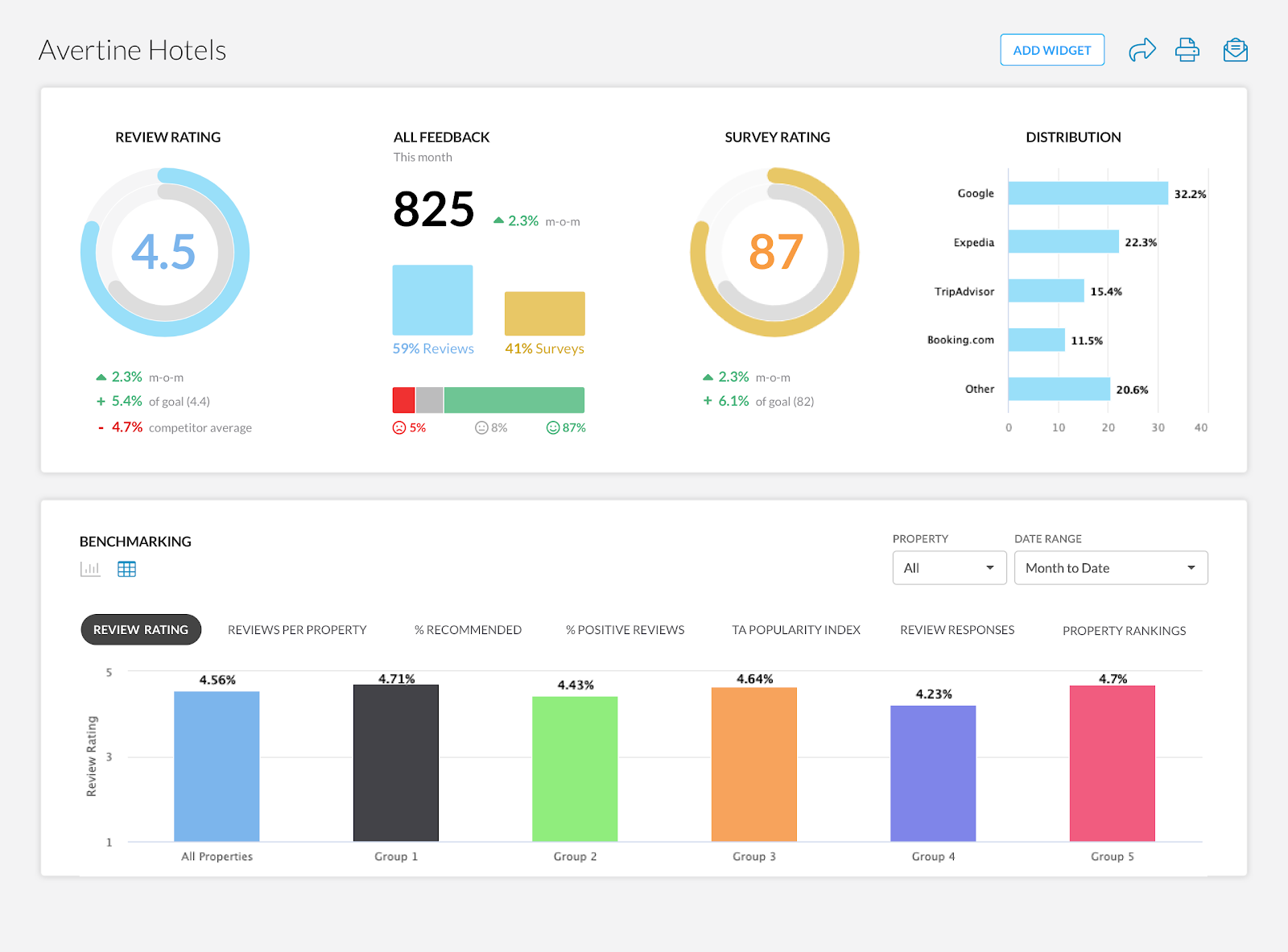
Revinate focuses on guest feedback for hotels, with review aggregation, sentiment analysis and benchmarking. A screen in the back office keeps the guest voice in front of the team that can act on it.
Key takeaways
Revinate collects reviews from multiple platforms and categorizes the feedback.
Sentiment and benchmark views make quick, readable wall content.
Fugo refreshes the dashboard on a schedule you set.
Back-of-house areas suit this content better than guest-facing lobbies.
What the Revinate dashboard tracks
Aggregated reviews
Reviews from several platforms appear together, so staff do not check each site.
Sentiment analysis
Sentiment trends show whether guest mood is improving.
Feedback categories
Categorized feedback points to the part of the stay that needs work.
Performance benchmarking
Benchmarks place the property against comparable ones.
Alerts
Automated alerts highlight what staff should look at first.
Who uses it and what to show them
| Team | What to put on the screen |
|---|---|
| Hotel managers | Overall sentiment and the newest reviews by category. |
| Guest relations | Open feedback themes that need follow-up. |
| Marketing teams | Review scores and benchmark position. |
| Multi-property managers | One view per property, rotated through a playlist. |
Put Revinate on a screen with Fugo
- 1
Choose a feedback view
Pick the Revinate view that matches the daily huddle, such as sentiment by category, and keep it to a few large figures.
- 2
Connect it to Fugo
Add the Revinate page in Fugo and enter the sign-in details. Fugo stores the credentials encrypted and signs in on your behalf, and it can generate the one-time codes if the account uses two-factor authentication.
- 3
Crop and position the view
In Design Studio, crop the page to the charts that matter and set the scroll position, so the screen shows data rather than menus and toolbars.
- 4
Set the refresh interval
Choose how often Fugo loads a fresh view, from every few minutes to a few times a day. The screen shows a regularly refreshed snapshot, not a live video feed.
- 5
Add it to a playlist
Put the dashboard in a playlist, set how long it stays visible, and rotate it with other dashboards if the screen is shared. Then assign the playlist to the screens that need it.
Put it where the team meets
A staff canteen, back office or briefing room tends to work well. Guest-facing hotel content is covered on the hotel signage page.
Frequently asked questions
How often is the data updated?
Can revinate connect with other hotel systems?
Can I access it on mobile?
Similar dashboards
Other dashboard tools that work with Fugo
Power BI for Utilities
Gain insights into utility operations with Power BI, enabling data-driven decisions through real-time analytics and performance metrics.

Bloomberg Terminal
Access real-time financial data, analytics, and trading tools with the Bloomberg Terminal dashboard, designed for informed investment decisions.
RoomKeyPMS Analytics
Gain insights into your hotel's performance with RoomKeyPMS Analytics, featuring real-time data, occupancy trends, and revenue metrics in one place.