






More than four in five Americans say they’ve purchased a product because its signage caught their eye. And yet, traditional printed signage simply can't keep pace with modern retail. So why are digital signage displays still so rare as an in-store marketing tactic?
Avoiding digital signage as an in-store marketing tactic could potentially be costing you thousands in unrealized revenue. The good news is, it’s not hard to get started. The right tools can help you build eye-catching displays that support visual merchandising in any retail space.
This article exposes everything you’re missing as a brick-and-mortar store without a digital signage campaign. It also explains how to get started with a program, plus some optimization strategies you can replicate at your store.
Why In-Store Retail Marketing Still Attracts Customers (& What It’s Still Missing)
While online shopping remains a major piece of the retail puzzle, nothing can match the power of the physical store. A whopping 64% of Americans shop weekly in a store, and 45% say it’s their primary method of shopping even today.
But that’s not to say traditional in-store marketing techniques aren’t outdated. For one thing, static printed displays create delays, waste, and sometimes, inconsistent branding (especially across multi-location chains).
Making seasonal updates might require a huge amount of manual effort, which only gets more frustrating as your business grows.
You have to worry about shipping delays, which could prevent promotional materials from arriving on time at specific stores. You might need to work through the night, rush between locations, and pick and choose which stores should be ready for launch day. This ultimately results in exhausted staff and thousands of dollars in rush printing fees.
And keep in mind this isn’t a one-time gig — you’ll have to do it all over again whenever your stores, holidays, or promotions change.
Thing is, we both know that your customer’s in-store experience can make or break their desire spend more.
But digital signage can change this entirely.
You just need to implement it into your business first.
What digital signage does for in-store marketing
Digital signage in a retail environment can help you produce effective marketing campaigns at scale. Create collateral for your campaigns, push it to your audience, and manage custom signage across multiple locations.
The benefits of digital signage for in-store marketing are extremely well documented. Approximately four in five brands say they sold 33% more product upon implementation, according to their sales data. Another 83% reported better customer engagement — all thanks to putting more digital screens around the store.
You can use digital signage in a retail marketing strategy to:
- Capture attention at high-intent moments throughout the customer’s store journey. This could be a product advertisement at the store’s entrance, aisle ads, or even videos at your POS. Studies from Mood Media found that 58% of shoppers notice in-store signage, which can help boost sales by as much as 24% (or 50% of shoppers who notice the signs).
- Set up dynamic visuals with multiple content types. Considering the average shopper sees over 4,000 ads per day, cutting through the clutter will be paramount for in-store marketing campaigns. Plus, digital signage supports multiple content types — think video, social feeds, and live data — which captures attention more quickly and improves the customer’s in-store experience.
- Making every customer feel special. Modern technology offers all-new ways to use customer data in building better relationships. For example, you can send out specialized marketing messages whenever your most highly engaged prospects walk by your digital screens. This might encourage shoppers to use personalized coupons, which enhances the shopping process and can potentially increase sales.
- Drive awareness to sales. A whopping 95% of consumers say that they regard in-store media advertisements either positively or neutrally. This ultimately drives 44% of them to make a purchase after seeing a digital ad, and 71% to at least consider a brand.
How to set up in-store marketing campaigns for your brick-and-mortar store
Has digital signage piqued your interest for an in-store marketing campaign?
Here’s the five-step process you must follow to set up an in-store campaign for yourself:
1. Set measurable goals
First, decide what you want out of your in-store signage. Is it improving your customer experience? Boosting impulse purchase? Or perhaps increasing the number of repeat customers?
Then, quantify the endpoint by setting measurable sales goals or KPIs. From here, you can set goals using the SMART framework: Strategic, Measurable, Attainable, Relevant, and Timely. This might be:
- A 50% increase in in-store promotions redemption (like using coupons or purchasing items on sale)
- A 10% YOY increase in specific target audience segments (like mothers and babies)
- A 30% increase in customer foot traffic
Now that you know your start point and end point, it will be easier to backfill the strategic actions required.
Let’s take a closer look at these below.
💡Sidenote: How do you physically measure certain digital signage metrics?
That depends on the tools you have available.
But if you’re trying to measure foot traffic or in-store events and experiences, you might rely on tools like people-count sensors. These tiny cameras monitor foot traffic by entrances, generate heatmaps from sensor data, and measure dwell time per zone. They also allow you to export data that’s specific to individual retail stores.
As for attribution, you could assign tracking links to QR codes to determine how many people downloaded something off a screen (and thus, how much in-store signage can drive sales at your location). Other techniques include:
- Impressions and reach
- URL visits
- Referral program upticks
- Assisted conversions
- Before and after sales growth
2. Decide on the right in-store marketing strategies for your needs
So you have an objective and clear KPI. Now, let’s decide on which in-store advertising strategies make the most sense for you.
With digital signage, this could be content for:
- Limited offers
- In-store events, like ‘bring a friend’ specials
- Influencer partnerships
- Loyalty programs
- Seasonal marketing campaigns
3. Build your retail marketing plan (budget and timeline)
In-store digital marketing strategies don’t have to be expensive when you use a cost-effective digital signage program. That said, it’s still a good idea to allocate a budget for signage so you have a better idea of what to expect each month.
First, price out the cost of a digital signage platform. If you’re not doing this in-house, allocate more budget to tasks like content creation, automation, integrations, maintenance, and more.
This can also help you select the right digital sigange retailer for your needs. For example, you may want to opt for a cloud-based CMS so you can create, schedule, and update content from anywhere. That way, you don’t need to physically swap content via thumbdrive or rely on a dedicated IT team to manage your signage network.
4. Train your staff
There’s no way to run your in-store displays without giving your team members at least a cursory education. You may want to train staff on how to perform content updates, troubleshoot screens, and run daily health checks to update your IT team (if necessary).
If you have lots of locations, you might want to assign campaign owners to each store. This gives you a point of contact for updating screens when necessary, as well as calculating metrics like sales data and customer loyalty (more on this later).
5. Test, don’t guess
Before you invest whole-cloth (er, screen) into an in-store marketing strategy, take some time to test your idea and see how profitable it might be.
For example, you might:
- Benchmark in-store advertising from competitors and document their tactics
- A/B test messaging on screens (like different screens in different local businesses)
- Ask current and potential customers what they think about your digital signage with an in-store survey
It’s also a good idea to calculate the ROI of your digital retail marketing efforts. By tracking metrics and KPIs like signage cost per conversion and sales lift per campaign, you can get a better idea of how much you’re making on your digital marketing strategy.
Knowing your numbers can also help you iterate on content. Noticing an uptick in foot traffic for coupons in retail stores? You might want to lean heavier into that strategy. Seeing better customer loyalty with more personalized digital displays? Adjust your in-store marketing accordingly.
6 ways to improve in-store marketing with digital signage
Now that you know how to set up an in-store marketing campaign, let’s take a closer look at how to optimize it going forward.
Sync promotions across locations
You can always create separate brand marketing campaigns for different store locations. But this can get annoying and cumbersome fast, especially if you have one digital signage manager to oversee 30+ stores.
The easier solution is to schedule content in advance with recurring playlists and schedules. That way, all your screens are synced with the same types of content. You can also set expiry dates automatically, which means nothing runs past its sell-by date.
Connect your brand asset library directly to your screens
Most creative teams use DAMs to manage in-store content. But signage is typically managed separately by IT or AV vendors. What to do?
The right in-store marketing partner can help you set up a Canto integration that lets you pull approved brand assets directly from the DAM into your signage CMS. That way, you don’t have to manually re-upload everything to your signage platform, and there’s no version confusion when updating screens.
One UK Fitnesswear brand connected its Canto DAM to Fugo to unify in-store screen content with its broader brand channels. With a smash success at its flagship London store, the company now plans to scale its rollout to both Europe and the US.
“With this integration, Canto is helping bridge the gap between creative teams and in-store experiences while bringing the same clarity and control to screens that our customers already expect across their digital channels. We’re excited to partner with Fugo on this rollout and to see a major retail brand leading the way in unifying content workflows across physical and digital environments.” — Matt Irving, Head of Channel at Canto
Always show content at the right time with scheduling and triggers
Content triggers automate updates based on external conditions. For example, whenever its raining outside, your signage screens might advertise a special for hot tea instead of cold matcha. This allows your screens to stay relevant without constant babysitting or manual intervention.
Think about options for:
- Time-of-day targeting (morning commuters vs. afternoon browsers)
- Seasonal campaigns, such as for changing weather
- Event-based triggers, like holidays or foot traffic increases
Boost engagement with your loyalty program and social growth
Who said screens were just for in-store promotions? You can also use digital signage to boost customer loyalty, sign-up calls to action, and social proof via walls. This allows you to create more experiential marketing, which improves the customer experience and potentially increases your number of loyal customers.
Just look at Clean House, a 200+ store retail chain, which partnered with Fugo to drive loyalty program sign-ups and grow its Instagram following. With the help of digital signage, the company boosted its Instagram follower count by more than 15,000 people. It also launched a brand awareness campaign on in-store screens, which significantly improved its number of loyal customers.
Add interactive experiences with touchscreen displays
Depending on the resources available to you, you may also be able to set up interactive kiosks and touchscreen signage. These move beyond just passive displays and help you create hubs for product lookups, wayfinding, customer loyalty check-ins, and more.
Fugo, for example, supports interactive kiosk content so you can build more engaging in-store marketing hubs within your retail stores. Studies show that interactive content also increases dwell time and customer engagement.
Create omnichannel buying experiences
For example, you might track the customer’s purchase history within your store, as well as other local businesses participating in specific deals or sales. Then, whenever the customer runs their loyalty card at a point of sale, you can:
- Sync their displayed and online offers with your in-store screens
- Use QR codes to bridge channels for the customer to scan
- Show competitive market coupons for impulse buys
Fugo: The best digital signage management system for in-store marketing displays
In-store digital signage is the simplest way to improve the in-store experience for your customers. You just need the right CMS to close the gap between your creative team, your brand assets, and your physical stores.
It’s easier to use a cloud-based digital signage platform like Fugo to control all your screens from one simple dashboard.
Fugo offers:
- Ease of use: Let your marketing team update content without IT support or complex maps of your store layout.
- Scheduling power: Start set-it-and-forget-it campaigns with scheduled start and stop times
- Multi-location management: Let one person manage multiple stores from anywhere with a WiFi connection (yes, even from your free customer WiFi)
- Integrations: Connect to your existing brand stack, like your DAM, CRM, and data tools
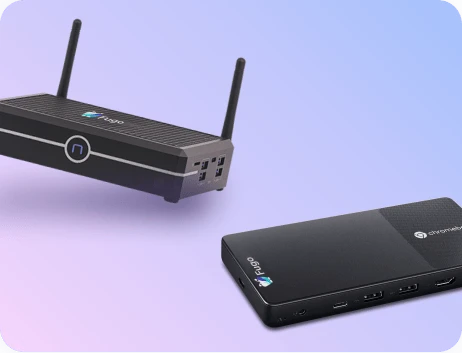
- Hardware flexibility: Run signage on the screens you already have, whether it’s on Windows, Android, Fire TV, Samsung, LG, or Chromebox
- Security: Build secure, enterprise-ready solutions on a certified SOC 3 Type II screen
Discover why hundreds of retailers around the world rely on Fugo to run their retail marketing campaigns.
Sign up for a 14-day free trial and start experimenting with signage-based in-store marketing strategies.
Frequently asked questions about in-store marketing with digital sigange displays
Q: What is in-store marketing?
In-store marketing is any promotional strategy that’s designed to influence customer purchasing decisions while they’re inside a brick-and-mortar store. This includes physical signage, digital displays, and other types of visual merchandising, all working together to guide a shopper toward buying a product.
Q: What companies help with in-store marketing?
Companies that can help with in-store marketing include:
- Digital signage software like Fugo
- Digital asset management tools like Canto
- Point-of-sale systems like Square
Q: How do you reflect visual marketing in an online store?
Using the same imagery, color palette, and campaign messaging can help reflect your visual marketing messages both in-person and online. Content management software like Fugo and digital asset management platforms like Canto can make this easier by acting as a single source of truth for all approved brand assets. That way, your in-store screens and online store content always look the same.
Q: What are some design tips for retail digital signage?
To make the biggest impact on customer engagement, be sure to design digital signage that is:
- Short and visual, since shoppers skim more than they read
- Use zoned layouts to show promotions, brand images, and social media links at the same time
- Create pre-built templates for multiple store locations that help speed up seasonal turnarounds
- Pull signage from a connected DAM so every screen automatically reflects approved assets
With the Fugo Design Studio, you can build content directly in the platform. It’s like Canva but for TV screens, minus the graphic design degree.
Q: How do brick-and-mortar stores install in-store marketing screens?
The best way to implement in-store marketing with digital signage displays is to:
- Audit existing displays
- Install Fugo players
- Configure content templates
- Schedule a content calendar
- Train frontline staff on best practices
- Enable remote content updates

