






Drag-and-drop technology certainly isn't new. And in 2025, drag-and-drop scheduling has become a standard feature across productivity categories.
Millions of people already use drag-and-drop features to organize files, plan calendars, and manage work across the tools they use every day. That familiarity matters more than most teams realize, especially in a time where speed and team communication matters more than ever.
Unfortunately, many digital signage tools still rely on scheduling processes that don’t reflect how modern teams work. Upgrading to more modern scheduling can help you save time, cut labor costs, and manage content for your business easier.
This guide explains why you should make the switch to drag-and-drop scheduling with a breakdown of its benefits, pros, and best practices.
What is drag-and-drop scheduling?
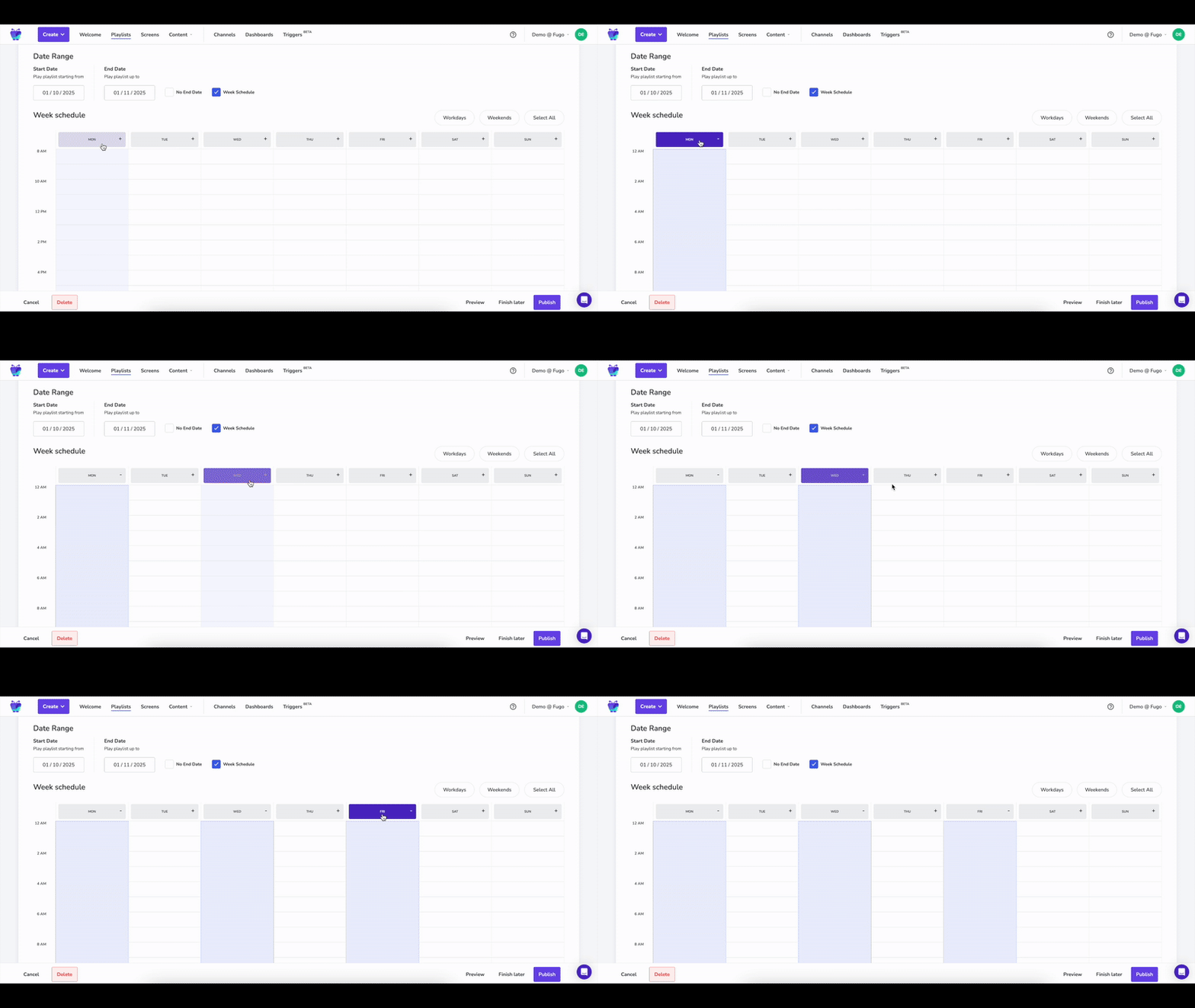
Drag-and-drop scheduling is a visual way to assign content to specific screens, locations, and time slots by clicking and dragging items directly into place. Instead of configuring rules, timelines, or playlists like traditionally scheduled content, you can arrange slides on a timeline the same way you would on a physical calendar or board.
You may have the following scheduling options to play content:
- Indefinitely
- During date ranges
- On weekly schedules
- Down to the minute
- With triggers or workflows
How does drag-and-drop scheduling software work for digital signage?

Drag-and-drop scheduling works by letting teams place content or playlists directly onto a schedule. A content management system, or CMS, manages the code for this in the background.
Once you create and upload your content, you drag and drop it into the right spot on your virtual 'calendar.' Users can click on a task block, hold the mouse button, and drag it to a new start time or position.
Your drag-and-drop schedule should show both your recurring content structure and the specific content inside it. That way, schedule changes don’t require rebuilding everything from scratch. This is also helpful when plans change, which in frontline industries, they always do. If a promotion needs to start earlier, run longer, or swap out temporarily, your team can adjust the schedule visually without breaking the underlying recurrence.
Then, depending on the program, you can set up rules around triggers, weekdays, and weather. This could be setting up menus that advertise hot drinks during cold weather. Or, real-time updates for wait times at your local clinic.
The result is twofold: a flexible scheduling process for your entire team, and a system that's easy to understand for anyone who inherits your signage system.
The drawbacks of traditional scheduling options
There’s no shortage of ways to schedule content onto a screen.
But for most growing small businesses, the traditional methods don't make sense.
Here's why.
Traditional playlists
Non drag-and-drop playlists make sense for ultra-small businesses with a single person managing infrequent updates. But they're often more frustrating than useful in businesses where:
- Promotions change weekly
- There are multiple screens across multiple locations
- You have multiple people trying to schedule templates
It can be difficult to make small changes without reordering, duplicating, or rebuilding playlist logic. This increases the risk of errors and outdated content slipping through. You also have to worry about manually checking dates within your system. There's no way to schedule anything in just a few clicks.
USB drives
USB-based content scheduling is technically cheaper than CMS software. But the content may be difficult to maintain consistently. You won't have access to version control, and updating any content depends on having physical access to your screens. Worse, it’s hard to know what’s playing on your screens without being on-site or asking a co-worker for photos.
Computer screen mirroring
Mirroring does offer some value in signage programs, like putting up presentations on conference room TV screens. That said, it's not inherently designed for scheduling content playback.
For one thing, it ties your screen to a single device, which creates a single point of failure.
Speaking of failure, it's much easier to simply stop working. When the source machine sleeps, disconnects, or updates, the screen will go dark until you address the problem.
Why your next digital signage platform must offer drag-and-drop scheduling

Modern drag-and-drop scheduling helps teams operate visually, iteratively, and with minimal handoffs.
Here's why simple scheduling in your digital signage CMS matters:
- Saves time. Drag-and-drop scheduling dramatically cuts time spent on manual scheduling. The ease of moving tasks allows teams to respond quickly to last-minute changes without overhauling the entire plan.
- Cuts labor costs. You'll spend less time struggling with backend tech or day-of scheduling processes. With more control over your
- Is user-friendly. Drag and drop scheduling tools are designed to be intuitive and easy to use, often requiring minimal training for users. Anyone on your team should be able to schedule content in just a few clicks.
- Avoids information silos. Real-time visibility in scheduling helps prevent misunderstandings and ensures that all team members are aware of their shifts and responsibilities. For customers, it ensures they get the right information at the right time. Like not trying to order from the breakfast menu when you've switched to lunch, for example.
- Facilitates creativity. Most digital signage teams don’t struggle with what to show on their screens, but instead, getting content live at the right time. Drag-and-drop scheduling removes the technical complexity of setting up content flows. That way, people on your team have more time to think about (and execute on) good-looking content.
Strategies for effective drag-and-drop content scheduling
Drag-and-drop digital signage isn't perfect by default.
That's why you should:
Daypart your schedule
Dayparting means dividing your day into blocks and assigning content to each segment. That way, audiences always see messages that are relevant to the time of day. In a restaurant, for example, you might play breakfast menus in the morning, lunch offers mid-day, and dinner promotions in the evening.
Setting up a good daypart also means deciding when to end specific content. You may only run certain signage on certain days of the week, decide on fixed date ranges for seasonal campaigns, or set exact start and end times down to the minute.
Integrate with your DAM

Scheduling works best when it’s directly connected to your asset library. Some CMS platforms let you integrate with Digital Asset Management platforms, or DAMs, to pull assets, build playlists, and assign them to screens without switching tools.
This makes it easier to find content quickly and make instant updates when the need arises.
“Connecting digital asset management to physical spaces opens up a powerful new dimension for brand storytelling." — Matt Irving, Head of Channel, Canto
Set up user roles and permissions
The core benefit of drag-and-drop is usability — but you might not want everyone on your team to have access to specific rules or content pieces. Setting up structured user permissions (think content creators, editors, and publishers) can help you avoid accidental changes across multiple people and locations.
Frequently asked questions about drag-and-drop scheduling for digital signage
Q: What are the best drag-and-drop scheduling software tools?
The best drag-and-drop scheduling software includes the following providers:
- Fugo is a digital signage content management system that offers a drag-and-drop scheduling tool.
- Connecteam provides a drag-and-drop scheduling tool along with a suite of HR tools.
- When I Work offers automatic scheduling based on employee availability and business needs.
- Jobber's interface allows for dragging jobs to different technicians or rescheduling appointments based on real-time availability.
- Akiflow consolidates tasks from various applications, allowing users to drag them onto a calendar to plan their day.
- Buddy Punch is a drag-and-drop scheduling software that allows users to create schedules quickly and easily.
- Sling is a drag and drop scheduling software that helps businesses optimize labor costs and improve communication.
Q: What is drag-and-drop scheduling?
Drag-and-drop scheduling lets you assign content to screens and time slots on a visual timeline. That way, you can move content directly into a calendar-like timeline without setting rules or dealing with coding logic.
Q: Can ChatGPT schedule digital signage content for me?
Not directly. ChatGPT can help you generate content ideas, captions, or posting calendars, but it can't push content to screens or manage schedules on its own. You’ll still need a digital signage platform with scheduling tools to handle deployment and playback.
Q: Can you drag and drop in Google Calendar?
Google Calendar supports drag-and-drop for events, which are useful for visual planning and personal scheduling. But this isn't designed for digital signage workflows, recurring playlist management, or multi-screen control.
Q: Is there a free scheduling tool for digital signage?
Yes, there are free ways to schedule content, but they typically come with limitations. Tools might restrict the number of screens, feature access, or your ability to set recurring schedules. If you run multiple locations or want to schedule complex content, you're better off investing in a CMS platform.
Q: How will drag-and-drop scheduling software change digital signage in 2026?
AI is increasingly being used in scheduling software to optimize schedules based on historical data and employee availability. You can also automatically update content using triggers to improve team communication. For example, instantly displaying new sales data on a conference room TV whenever a team member marks a deal 'closed' in HubSpot.

